Features

One agent.
Every part of your business.

Anthropie isn't a pile of tools with a chatbot on top. It's one platform built on what Phil knows about your business, so every feature, from the phone to the inbox, can be run by simply asking him.

Watch the full tour Every feature, on a real account. Get the video by email.

Want to see it on your own business? Request a live demo · See plans & pricing

Every feature is its own AI agent. Phil runs the team.

Behind every feature above is a dedicated AI agent with its own focus and its own tools. You never manage them one by one. You talk to Phil, and he briefs the right agents, runs several at once when a request spans areas, and brings you back a single answer.

Phil
PhilBriefs, orchestrates and reports back to you.

Receptionist

Answers calls, books, texts and logs every one.

Chat

Talks to website visitors and qualifies leads.

Email

Triages the inbox and drafts replies in your tone.

CRM

Keeps contacts and pipeline, and prospects new leads.

Social media

Writes, schedules and publishes posts.

Blog

Drafts articles and publishes them once approved.

Reviews

Answers reviews and asks happy customers for one.

SEO

Plans keywords and optimizes content.

Analytics

Explains traffic, revenue and the week.

Calendar

Manages appointments and availability.

Tasks

Keeps reminders and asset upkeep on track.

Knowledge

Maintains the knowledge every other agent reads.

Watches

Monitors what you asked him to keep an eye on.

Approvals

Holds the drafts waiting for your OK.

Setup

Handles settings, numbers and the setup checklist.

Every agent starts from the same business knowledge, so they never contradict each other.
Phil picks the right agent, or several at once, and gives you one answer.
Anything hard to undo waits for your yes before an agent acts.

Knowledge is the core of the platform.

Phil can only run your business if he truly knows it. So everything starts with a living knowledge base: your services, prices, hours, policies, brand voice and the answers to the questions your customers actually ask.

Every feature reads from it. The receptionist, the chat widget, email replies, social posts, review responses and blog articles all say the same true thing, in your voice. That is what makes Phil, and every feature he runs, fully aware and able to operate the business.

  • Learned from your website, not typed from scratch
  • Fix a fact once and every channel is corrected
  • Custom scenarios: how to handle a quote request, a callback, an emergency
  • Audits itself for duplicates and contradictions
  • Phil remembers your rules and preferences between conversations
Business knowledge One source of truth
ReceptionistChatEmail repliesSocial postsReviewsBlog
You
Our deposit is now 40%, and we're closed the week of Christmas.
Phil
Saved both. The receptionist, the chat widget and email replies will say so from now on.

Everything Phil runs, and how.

One loop sits behind every feature below. Each one shows what Phil does for you, and a real way to ask him.

1

Knows

Phil reads your knowledge, his memory and your live data before he acts.

2

Routes

He hands the job to the right specialist, or to several at once for a multi-step request.

3

Acts

Real actions in your real tools: replies drafted, posts scheduled, contacts updated.

4

Asks

Anything hard to undo, like publishing, sending drafts or deleting, waits for your yes.

AI Receptionist

Receptionist & Complete

A phone line that answers every call, day and night. It qualifies the caller, answers from your knowledge, lines up the next step and logs the call.

How Phil manages it
  • Reads call transcripts and summarizes who called and what they wanted
  • Spots patterns: the questions callers ask most
  • Controls call forwarding: forward until a set time, pause, or switch off
  • Blocks spam numbers and clears them from the call log, after asking you
  • Provisions your business number once you give an area code
Draws on: Your hours, prices, policies and custom scenarios.
What you see
Call log
MD
Marc Dupont
No heating, wants a callback first thing
Callback
JM
Julie Martin
Booked a tune-up for Thursday, 2 PM
Booked
?
+1 (555) 013-2284
Spam call, filtered
Blocked
Ask Phil
You
Anything urgent from the phone last night?

Phil
Three calls after 6 PM. One needs you: a customer with no heating who wants a callback first thing. He's already in your CRM. The other two were a price check and a wrong number.

Live Chat

Complete only

A website chat that answers visitors from your knowledge, captures their details and qualifies the lead, around the clock.

How Phil manages it
  • Sets up the widget and hands you the embed code
  • Reads conversations and surfaces what visitors keep asking
  • Matches callers with chat visitors so one person is one record
  • Sends qualified leads straight to your CRM
Draws on: Everything on your website, plus the answers you add.
What you see
Website chat
Do you work weekends?
Yes, Saturdays 8 to 2. Want me to book you in?
Lead capturedSam K. · sam@example.com
Ask Phil
You
What are people asking on the website this week?
Phil
Mostly three things: do you work weekends, how much a tune-up costs, and how soon you can come. The weekend question isn't in your knowledge base yet. Want to give me the answer?

Email Intelligence

Complete only

Your inbox, triaged. Phil reads what comes in, ranks what matters and drafts replies in your tone, ready for your approval.

How Phil manages it
  • Gives you the inbox at a glance: urgent, to answer, handled
  • Reads, categorizes and marks emails as handled
  • Drafts replies and writes new emails from your business inbox (Gmail, Outlook or IMAP)
  • Searches what you already sent
Draws on: Your prices, policies and tone of voice, so replies sound like you.
What you see
Inbox
NS
Northwind Supply
Friday delivery: can you confirm?
Urgent
CB
Claire B.
Can we move Thursday?
To answer
NL
Trade Weekly
This month in the trade
Handled
2 drafts readyWaiting for your approval
Ask Phil
You
Anything urgent in my inbox?
Phil
Two. A supplier needs a yes on Friday's delivery, and a client wants to move Thursday's appointment. I drafted a reply to each. Want to read them?

Email Marketing

Complete only

Design a campaign in a template editor, let AI write it in your brand voice, and send it to a contact list. Open and click tracking is built in, so a separate newsletter subscription is one less bill.

How Phil manages it
  • Template editor with AI to write or rework the email, in your brand voice and colors
  • Contact lists, personalization by first name, send now or schedule for later
  • Results per campaign: delivered, opened, clicked, bounced, unsubscribed, with a delivery log
  • Phil builds your lists: he finds prospects and adds them to a list for you
Draws on: Your brand voice, colors and offers, so every template looks and sounds like you.
What you see
Email campaign
Spring tune-up offer
Book now
✨ Write with AI
1,240Sent
46%Opened
8%Clicked
Ask Phil
You
Add the 12 plumbers you just found to my "Spring offer" list.
Phil
Done. 12 businesses are on a new "Spring offer" list. Open Marketing when you want to write and send the campaign.

CRM & Prospecting

Complete only

Every call, chat and email creates or updates a contact with its full timeline. No data entry, and nobody falls through the cracks.

How Phil manages it
  • Finds any contact and shows their whole history
  • Reports on the pipeline: stats and stage breakdowns
  • Adds contacts, edits details, moves people between stages and logs notes
  • Lists who has gone quiet and needs a follow-up
  • Prospects: finds local businesses with a website and email, filtered by reviews, rating and social presence, then adds them to a marketing list
Draws on: Your services and ideal customer, so follow-ups say the right thing.
What you see
Pipeline
Lead
Sam K.Heat pump quote
Atelier RoyWebsite chat
Contacted
Marc D.Callback today
Booked
Julie M.Tune-up, Thursday
Ask Phil
You
Who hasn't heard from us in a month?
Phil
11 contacts have gone quiet, 4 of them already at "Booked". Want me to draft a check-in for each, so you can approve them?

Text Messages

Receptionist & Complete

Text your customers from the CRM, from a number that is verified for business messaging. Only people who agreed to receive texts are ever messaged, and every message lands on their timeline.

What it does
  • Consent is captured where customers already talk to you: the website chat and the phone receptionist
  • Send a text from any contact's page in the CRM, with one tap
  • Messages go out from a shared anthropie.ai number, or from your own number once its carrier approval comes through
  • Every text is logged on the contact's timeline next to their calls, chats and emails
Draws on: The contact's details and consent, so a number that has not opted in is never texted.
What you see
Julie Martin · Timeline
📞
Call
Booked a tune-up for Thursday
💬
Chat
Asked about weekend hours
Hi Julie, your tune-up is confirmed for Thursday at 2 PM.
Opted inSent from your business number

Social Media

Complete only

Posts written in your voice, with images, scheduled and published for you. Or switch on automation and let it run.

How Phil manages it
  • Writes posts for Facebook, Instagram, LinkedIn and more
  • Builds a post from your own photo and generates images when you have none
  • Schedules in your local time, and shows how posts performed
  • Turns automation on or off and changes its schedule
Draws on: Your brand voice, colors and what you actually sell.
What you see
Post preview
AYour BusinessScheduled
🛠️
Fresh tune-ups booked all week. Reserve yours before Friday!
Tomorrow, 9:00 AM·FacebookInstagram
Ask Phil
You
[photo] Post this one tomorrow morning.
Phil
Done. Caption written in your voice, scheduled for 9:00 AM tomorrow on Facebook and Instagram. Want to see it first?

Blog Articles

Complete only

Full articles written from your knowledge, saved as drafts, and published to your WordPress site only when you say go.

How Phil manages it
  • Writes a new article and saves it as an unpublished draft
  • Lists, finds and re-reads what you already have
  • Edits an article on request
  • Publishes to your connected WordPress site after your approval
Draws on: Your services, service area, pricing and tone.
What you see
Article
When to replace your water heaterDraft
EditPublish to WordPress
Ask Phil
You
Write an article on when to replace a water heater.
Phil
Draft saved, using your service area and pricing, in your tone. Have a look and I'll publish it to your site when you say go.

Reviews

Complete only

Your Google reputation, watched and answered. New reviews come in, replies are drafted, and happy customers get asked.

How Phil manages it
  • Syncs new reviews from your Google Business Profile
  • Reports average rating, sentiment and reply rate
  • Drafts and posts replies to reviews
  • Runs the daily review-request emails: check, switch on or off, send now
Draws on: Your tone and policies, so a 2-star reply is apologetic, not defensive.
What you see
Reviews
★★★★★Dana R.
Fast install, super clean. Highly recommend!
Draft reply
Thank you, Dana! We are glad the install went so smoothly.
EditPost reply
Ask Phil
You
Any new reviews?
Phil
Two. A 5-star about the fast install, and a 2-star about a late arrival. I drafted a reply to both. The 2-star one apologizes and offers a call.

SEO & Analytics

Complete only

Search visibility, website traffic and revenue, explained in plain language, with the next move attached.

How Phil manages it
  • Builds a keyword strategy and optimizes content for search
  • Explains your website traffic and where visitors come from
  • Reads revenue from your Stripe account: sales, refunds, payouts, top customers
Draws on: Your services and locations, so advice is about your market, not a generic one.
What you see
Search visibility
KeywordPosition
emergency plumber#3 ▲ 2
water heater repair#7 ▲ 5
boiler service#12 ▼ 1
Ask Phil
You
How did we do this month?
Phil
Traffic is up, and most of it comes from people searching for emergency repairs. Revenue is ahead of last month. Next move: an article on that search, since you have none.

Calendar & Appointments

Receptionist & Complete

Appointments are booked straight into your Google Calendar, and Phil lets you view and manage them just by asking.

How Phil manages it
  • Shows what's coming up and checks your availability
  • Creates, reschedules and deletes calendar events
  • Sees the appointments your receptionist booked, so nothing double-books
Draws on: Your hours and booking rules.
What you see
Thursday
9:00 AM
Site visit · Mr. Dupont
11:30 AM
Free
2:00 PM
Tune-up · Julie Martin Booked by receptionist
Ask Phil
You
Block Thursday afternoon for the site visit.
Phil
Thursday afternoon was free, so the site visit is on your calendar.

Tasks & Assets

Complete only

Your team's to-do list and the things your business owns, run by asking. Reminders and upkeep never slip.

How Phil manages it
  • Keeps the shared to-do list: add, complete, reschedule
  • Tracks your assets (boats, vehicles, equipment) and their status
  • Sets maintenance reminders on a specific asset
Draws on: Your team and the assets you have registered.
What you see
To-do
✓Send the quote to Mr. Dupont
Call supplier about FridayTue
Service the Sea Breeze engineMaintenance
Ask Phil
You
Remind me Tuesday to call Mr. Dupont about the quote, and to service the Sea Breeze engine next month.
Phil
Two reminders set: Tuesday for the call, and next month for the engine, linked to Sea Breeze.

Dashboard & Insights

Receptionist & Complete

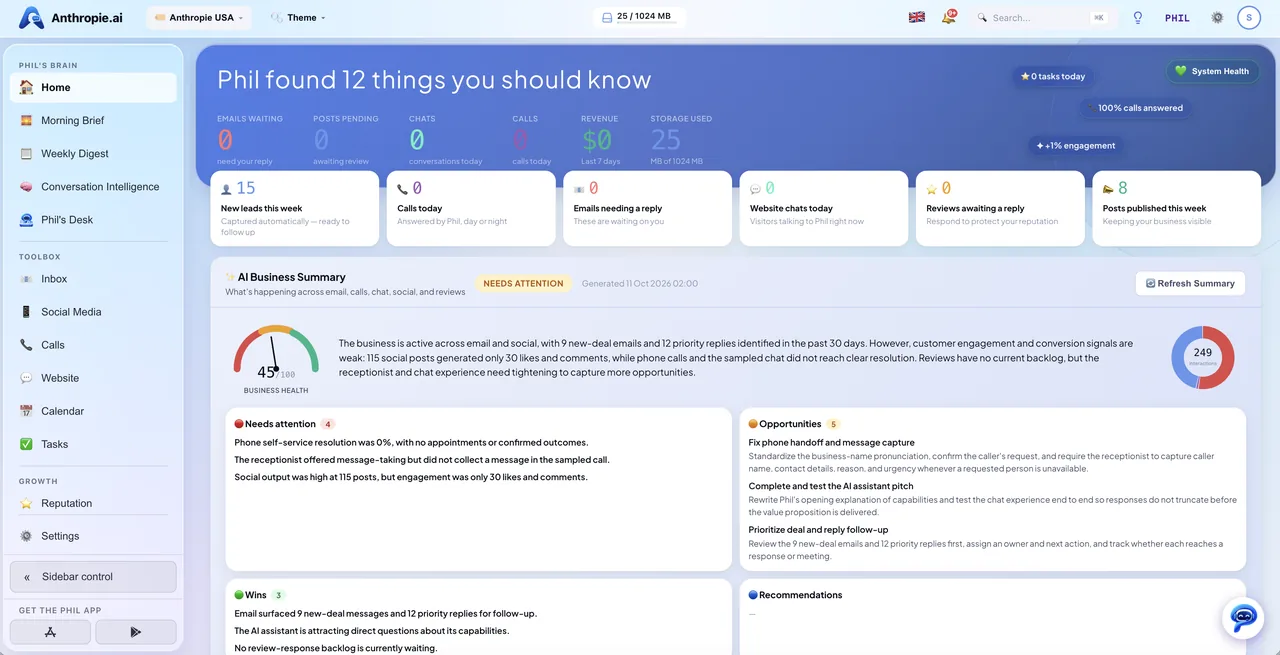
Your activity and the numbers that matter, live on one screen, and Phil explains what you are looking at.

How Phil manages it
  • Real-time insights across the channels you use
  • Answers any question the dashboard raises, in plain language
  • Points out what changed and what to do about it
Draws on: Your goals and priorities, so he tells you what matters to you.
What you see
Dashboard
42Calls
118Chats
17New leads
4.8Rating
Ask Phil
You
Why are calls down this week?
Phil
Saturday's forwarding was paused and Thursday was a holiday. Want me to turn forwarding back on?

Morning Brief & Weekly Digest

Complete only

An overnight summary when you wake up, and a weekly report with recommended actions, prepared for you without asking.

How Phil manages it
  • Morning Brief: new leads, missed calls, emails to handle and social activity since yesterday
  • Weekly Digest: emails, calls, chats, posts, new contacts and pipeline changes across all channels
  • Ends with the next move, not just the numbers
Draws on: Everything happening across your channels.
What you see
Morning Brief
Good morning. Here is your night.
3new leads
2missed calls, already followed up
5emails to handle
Ask Phil
You
Give me the week in three lines.
Phil
17 new leads, mostly from the website chat. Two calls went unanswered on Saturday, both followed up. Next move: six quotes are still waiting for a reply.

Watches & Approvals

Complete only

Tell Phil what to keep an eye on. He watches in the background, prepares the follow-up himself, and waits for your OK before sending.

How Phil manages it
  • Watches for: new leads, new reviews, missed calls, contacts going quiet, emails left unhandled, a keyword in a chat, call or email, new appointments, payments
  • Lists, pauses, changes and removes watches on request
  • Keeps a queue of drafts he prepared: show, edit, approve (sends) or reject
  • Shows the history of what he sent for you
Draws on: Your tone and policies, so the drafts he prepares are ready to go.
What you see
Watches & approvals
Email unanswered for 2 days
New review
Draft readyFollow-up to Claire B.
EditApprove
Ask Phil
You
Tell me when an email sits unanswered for two days.
Phil
Done. I'll flag anything left unhandled for two days, with a reply already drafted and waiting for your OK.

Setup & Settings

Receptionist & Complete

Getting started and staying configured, without hunting through menus. Ask what's left and Phil walks you through it.

How Phil manages it
  • Reads your Get Started checklist and tells you the next step
  • Switches features on or off and updates account settings
  • Shows your plan, renewal date and trial status
Draws on: How your account is set up today.
What you see
Get started
4 of 6 done
✓Connect your inbox
✓Get your phone number
Connect Google Business ProfileNext
Ask Phil
You
What's left to set up?
Phil
Two things: connect your Google Business Profile so I can read reviews, and add your Instagram. Want me to walk you through the first one?

Example conversations are illustrative. The Receptionist plan includes Phil, the AI phone receptionist (24/7 calls, bookings and SMS), Google Calendar appointments, and the dashboard. The Complete plan includes all of that, plus everything else.

Ready to put Phil to work?

Start your free trial today. No credit card required.

Get Started Free See pricing See Phil in action Contact us Get a live demo